
Читал документацию по Google AJAX Language API. Ну, а чтоб времени зря не терять, написал небольшой контекстный переводчик. Работает только с Firefox и Greasemonkey. Результат перевода слова, на которое был наведен курсор мыши, отображается в статусной строке (если доступ для js к изменению статусной строки открыт). Результат перевода элемента (абзаца, ссылки и т.д.) записывается в атрибут title этого элемента, конечно, следует выводить перевод в более удобной форме, если будет интерес потом доделаю..
В данной части кода определяем иностранный и родной язык, далее идут шаблоны для поиска иностранных слов под курсором мыши.
Showing posts with label userscripts. Show all posts
Showing posts with label userscripts. Show all posts
2008-11-01

2008-03-20
Project: Google Reader autoscroll
Description
Autoscroll. Translate original page in GR window. View and mark items as read by means of a mouse wheel. View original page in GR window. Open original page in new tab by middle click in list view. Real fullscreen mode. Scan to first read/unread/starred item. Memory cleaner.
Does the interface of Google Reader slightly more conveniently. The current version works only with browser Mozilla Firefox and Greasemonkey.
Shortcuts
Tips
In list view use middle mouse button on subject, original page will open in new tab.
Change log / Demo
Version 0.913 changes:
+ Autoscroll;
+ View and mark items as read by means of a mouse wheel;
+ View original page in GR window (preview);
+ Open original page in new tab by middle click in list view;
+ Real fullscreen mode;
+ Scan to first read/unread/starred item;
+ Memory cleaner;
+ Toggle new/all items keyboard shortcuts.
Show video
Version 0.931 changes:
+ Google Translate integrated;
+ Popup mode for additional display (don't foget disable popup blocker for GR);
+ Copy current entry URL to clipboard shortcut.
Version 0.933 changes:
+ Source icon instead of a star;
+ Source title colorizing.
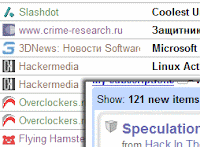
Feedback and Suggestions
Leave your comment in project page.
Installation
Show installation video
Install this script
Project Details
Name: Google Reader autoscroll
Verson: 0.935 (2008-04-20) (temporary not working)
Developers: 1
Development Status: 4 - Beta
Intended Audience: End Users/Desktop
License: Artistic License
Operating System: OS Independent (Written in an interpreted language)
Programming Language: JavaScript
Download: 24344.user.js (userscripts.org)
Autoscroll. Translate original page in GR window. View and mark items as read by means of a mouse wheel. View original page in GR window. Open original page in new tab by middle click in list view. Real fullscreen mode. Scan to first read/unread/starred item. Memory cleaner.
Does the interface of Google Reader slightly more conveniently. The current version works only with browser Mozilla Firefox and Greasemonkey.
Shortcuts
Tips
In list view use middle mouse button on subject, original page will open in new tab.
Change log / Demo
Version 0.913 changes:
+ Autoscroll;
+ View and mark items as read by means of a mouse wheel;
+ View original page in GR window (preview);
+ Open original page in new tab by middle click in list view;
+ Real fullscreen mode;
+ Scan to first read/unread/starred item;
+ Memory cleaner;
+ Toggle new/all items keyboard shortcuts.
Version 0.931 changes:
+ Google Translate integrated;
+ Popup mode for additional display (don't foget disable popup blocker for GR);
+ Copy current entry URL to clipboard shortcut.
Version 0.933 changes:
+ Source icon instead of a star;
+ Source title colorizing.

Feedback and Suggestions
Leave your comment in project page.
Installation
Project Details
Name: Google Reader autoscroll
Verson: 0.935 (2008-04-20) (temporary not working)
Developers: 1
Development Status: 4 - Beta
Intended Audience: End Users/Desktop
License: Artistic License
Operating System: OS Independent (Written in an interpreted language)
Programming Language: JavaScript
Download: 24344.user.js (userscripts.org)
Subscribe to:
Posts (Atom)



